 CaseDesk
An entire law office on your desk.
Every case. Every role. One app.
From intake through post-judgment, CaseDesk™ handles the docketing, deadlines, conflicts, evidence, documents, research, drafting, and billing on your own machine — it cites the statute behind every computed date, and its AI runs on your hardware. No readable copy of your case data on anyone’s servers — local by default, and optional Cloud Sync is end-to-end encrypted. Your files stay on your computer unless you switch on an integration.
Free beta on all three platforms · Windows, Linux & macOS v1.0.49 · no license key, no account · Windows build digitally signed throughout by Fulks, Inc. · Linux support is the newest part of the appAssociateParalegalLaw librarianDocketing clerkEvidence expertBookkeeperConflicts deskCourt researcher+ ten more
A short, silent product tour · fictional demo data.
Three things most case managers don't do
Most legal software is the same cloud database with a different logo. This isn't — CaseDesk runs its founder's own California practice, on real cases, every day.
Your files never leave your machine
Everything lives in an encrypted database on your own computer. Unless you turn on optional Cloud Sync, we operate no servers that hold your data — and even with it on, our server holds only ciphertext we cannot read. Nothing of ours joins a subprocessor list you have to explain to clients.
AI that runs on your own hardware
Run a legal-grade model entirely on your own GPU, or bring your own cloud key. Case-aware drafting and analysis with no per-seat AI tax — and no privileged work product handed to a vendor.
A chain of custody built to withstand challenge
Prove a document existed, unaltered, on a date backed by cryptographic proof rather than your say-so — then generate a court-ready declaration and certificate with one click. Under the hood it's a timestamp anchored to the Bitcoin blockchain; on your screen it's tamper-evident evidence, built into the case file.
Built for your practice area — down to the field
Not one generic form with a dropdown. 106 practice areas built on purpose-built data models — the fields, the doctrines, and even the math their cases actually turn on.
Your practice-area specialist
The right fields — and the right calculations
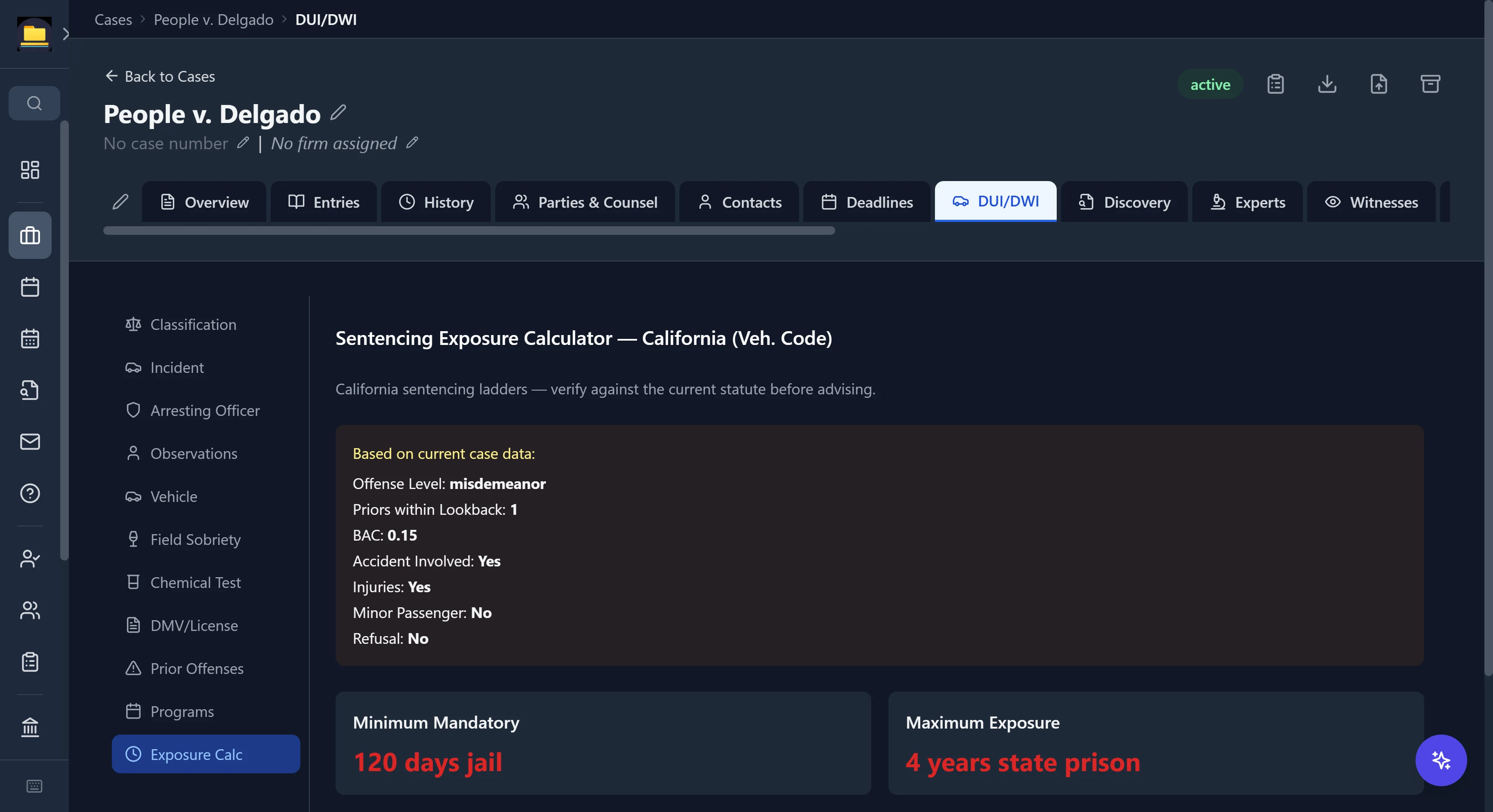
A DUI matter tracks field-sobriety clues, chemical-test partition ratios, and the DMV Admin Per Se hearing. An estate matter tracks the Heggstad petition and the creditor-claim bar. The typical specialized area carries roughly 180 distinct fields — and several areas compute, not just collect. Here, a California DUI's facts drive a live sentencing-exposure calculator.
- Purpose-built sub-sections per area — not a bag of generic "custom fields"
- Built-in calculators: DUI sentencing exposure, Lemon Law restitution, present-value damages
- Multi-party, treatment-timeline, expert, and element-by-element trackers where the practice needs them
- Honest by design: computed exposure is labeled "verify against the current statute before advising"
Liability status (invitee / licensee / trespasser) · actual vs constructive notice · government-claim deadlines · damages & expert-needs tracking
Accident reconstruction · admitted fault · airbag & injury detail · adjuster and arbitration · treatment status
Asset division & appraisals · support arrears tracking · custody · attorney-fee and sanctions requests
Pitchess, Marsden, Romero & Faretta motion tracking · Brady disclosure log · sentencing-guideline exposure
Offense tier · prior-count lookback · chemical test & partition ratio · DMV Admin Per Se · live sentencing-exposure calculator
WCAB case number & district office · QME/AME · Whole-Person Impairment & PD% rating string · MPN / UR / IMR
ABC-test classification · overtime & double-time · back-pay periods · PAGA aggrieved-employees · arbitration challenge
Answer-due tracking · warranty of habitability · buyout offers · notice service · bad-faith penalty claims
Schedules A–J · means-test result · §303(h) order for relief · cramdown plan · disposable-income commitment
Heggstad petition · IAEA authority · creditor-claim bar · Form 706 estate-tax due date · holographic/pour-over will
A-Number · asylum one-year clock · U / T / VAWA / SIJS · I-751 · LCA number · crime-of-moral-turpitude flags
Song-Beverly restitution & civil-penalty calculator · repair-visit log · mileage offset · manufacturer buyback
That's a dozen of them. Here's every one.
All 106 supported practice areas
They ship with purpose-built matter fields — pick one at intake and the case is built for that practice.
- ADA/Accessibility
- Administrative
- Adoption
- Agricultural
- Animal Law
- Antitrust
- Appellate
- Art Law
- Asset Forfeiture
- Auto Accident
- Aviation
- Banking/Financial
- Bankruptcy
- Cannabis Law
- Civil Rights
- Class Action
- Construction Defect
- Consumer Protection
- Contracts/Business
- Creditors' Rights
- Criminal Defense
- Cybersecurity
- Defamation
- DUI/DWI
- Education Employment
- Education Law
- Elder Abuse
- Election Law
- Eminent Domain
- Employment
- Entertainment
- Environmental
- ERISA
- Estate Planning
- Estate/Probate
- Family Law
- FDA/Life Sciences
- FELA (Railroad)
- Foreclosure
- Franchise
- General Liability
- Government Contracts
- Healthcare Regulatory
- HOA
- Hospitality
- Immigration
- Insurance Bad Faith
- Insurance Coverage
- Insurance Defense
- International Arbitration
- International Trade
- IP - Copyright
- IP - Patent
- IP - Trade Secret
- IP - Trademark
- Juvenile
- Land Use
- Landlord/Tenant
- Legal Malpractice
- Lemon Law
- Life Insurance
- M&A Litigation
- Maritime
- Mass Tort
- Media/Entertainment
- Medical Malpractice
- Military Justice
- Mining
- Nonprofit
- Nursing Home
- Oil & Gas
- OSHA
- Personal Injury
- Premises Liability
- Prison Litigation
- Privacy/Data Breach
- Product Liability
- Product Recall
- Professional Liability
- Professional Licensing
- Professional Malpractice
- Property Tax
- Public Finance
- Real Estate
- Securities
- Sexual Abuse (Civil)
- Shareholder Dispute
- Social Security
- Sports Law
- Subrogation
- Surety
- Tax Litigation
- Telecom/Utilities
- Title Insurance
- Toxic Tort
- Tribal Law
- Trucking
- Unemployment Insurance
- Vaccine Injury
- Veterans Benefits
- Wage & Hour
- Water Rights
- Whistleblower
- White Collar Crime
- Workers' Compensation
- Wrongful Death
Meet the staff you don't have to hire
Every role a case runs on, built into the app — here are the ones worth switching for.
Your evidence expert
Prove a document hasn't changed — to a jury
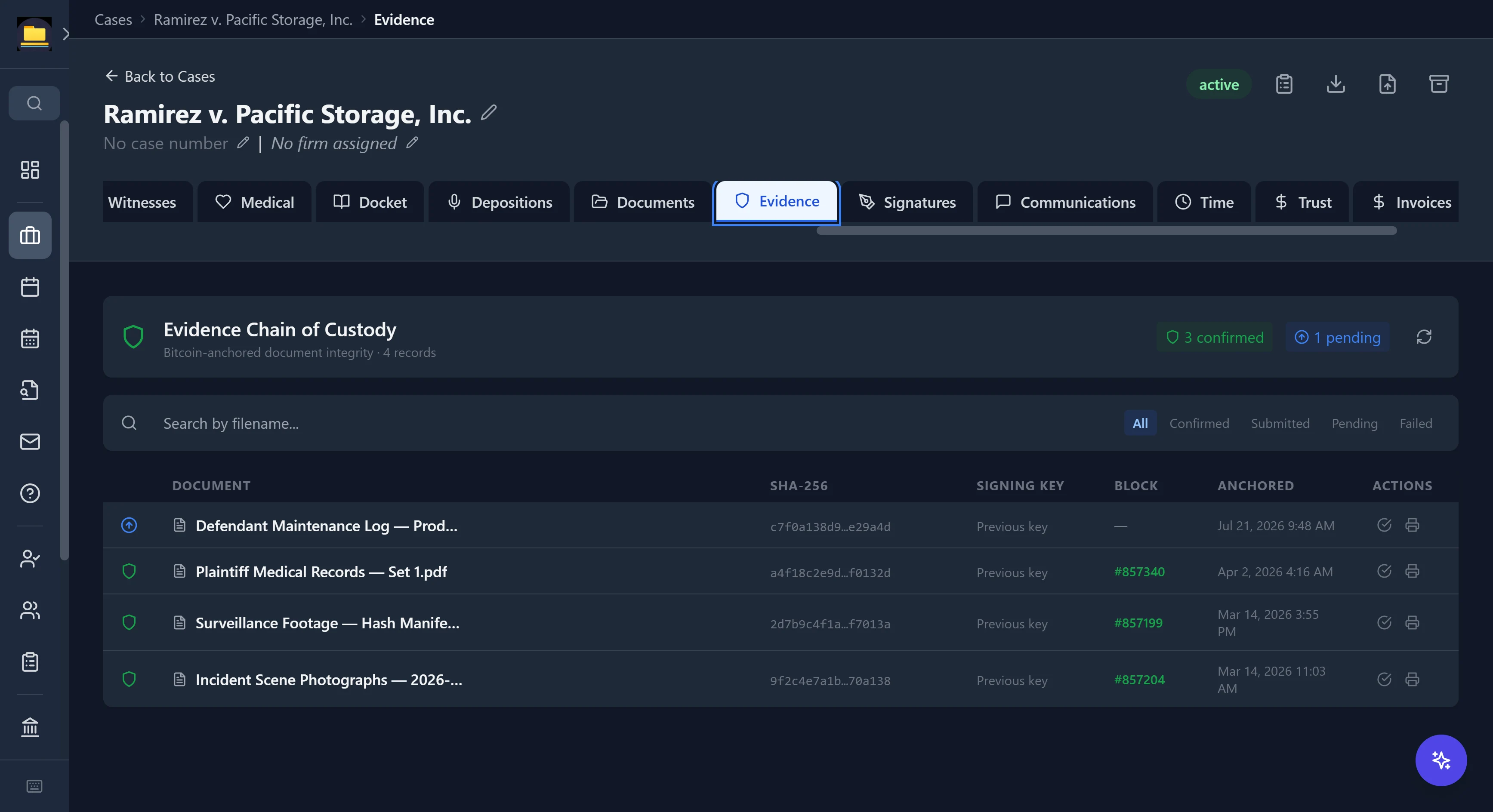
CaseDesk fingerprints each document with a SHA-256 hash — a unique cryptographic fingerprint of the file's exact bytes — signs it with your key, and anchors it to the Bitcoin blockchain through OpenTimestamps. The result is a timestamp no one can backdate or forge. It's built this way on purpose: CaseDesk's author wrote a book on Bitcoin protocol governance, and designed the feature around what the chain can actually prove.
- Per-document SHA-256 hash, signed and independently verifiable
- Anchored to a Bitcoin block — a public, immutable timestamp
- Live status: confirmed with block height, or pending confirmation
- One click generates a declaration and certificate of authenticity for filing
Your AI associate
Not a chatbot — an AI that works the file
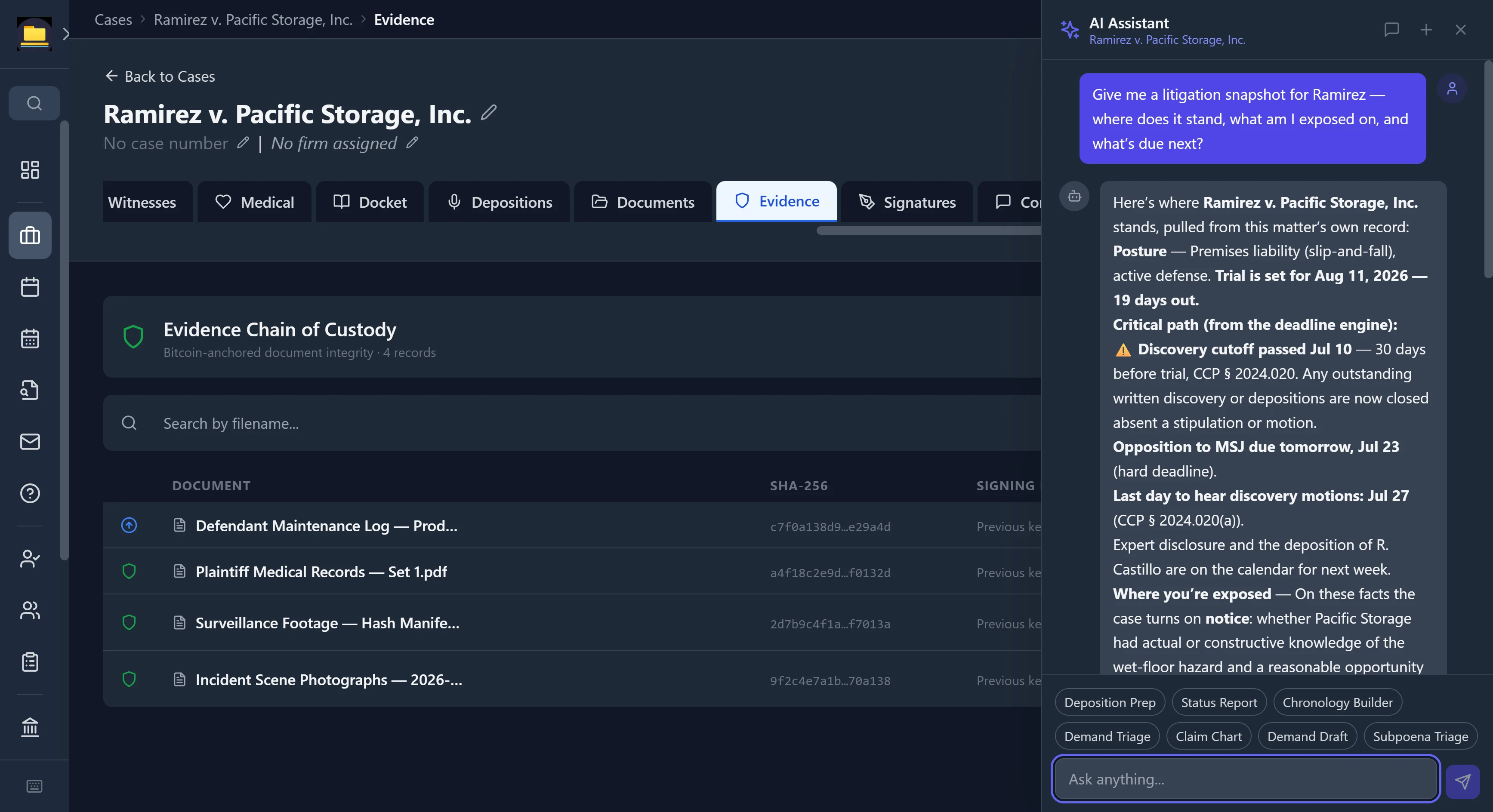
Ask for a litigation snapshot and CaseDesk answers from the matter's own record — deadlines, posture, exposure — then drafts from your templates. Run it on a local model so nothing leaves the building, or bring your own Anthropic or OpenAI key.
- Reads the open case: cites the trial date, the discovery cutoff, the governing rule
- Deep Summary reads a matter's documents and populates its practice-area fields for you
- Built-in litigation skills — deposition prep, claim charts, chronologies, demand drafting
- Fully local option: a legal-grade LLM on your own GPU, zero data out, no per-seat AI tax
The catalog, by name — every local model is a one-time download that runs entirely on your machine: DeepSeek V4 Flash (the multi-GPU workstation flagship, up to a 1M-token context), Qwen 3.8 27B (three sizes, 262K context, plus a 512K extended-context option), Qwen 3.6 27B (with multi-token-prediction speed-up where video memory allows), Qwen 3.6 35B-A3B mixture-of-experts, Gemma 4 31B, Gemma 4 26B MoE, and Gemma 4 E4B/E2B for small GPUs and CPU-only machines — most in two sizes, so CaseDesk can recommend the right fit for your hardware. Prefer your own? Point CaseDesk at any GGUF model file, connect your own Anthropic (Claude) or OpenAI key, or use any OpenAI-compatible endpoint you run or subscribe to — CaseDesk talks to it directly from your machine.
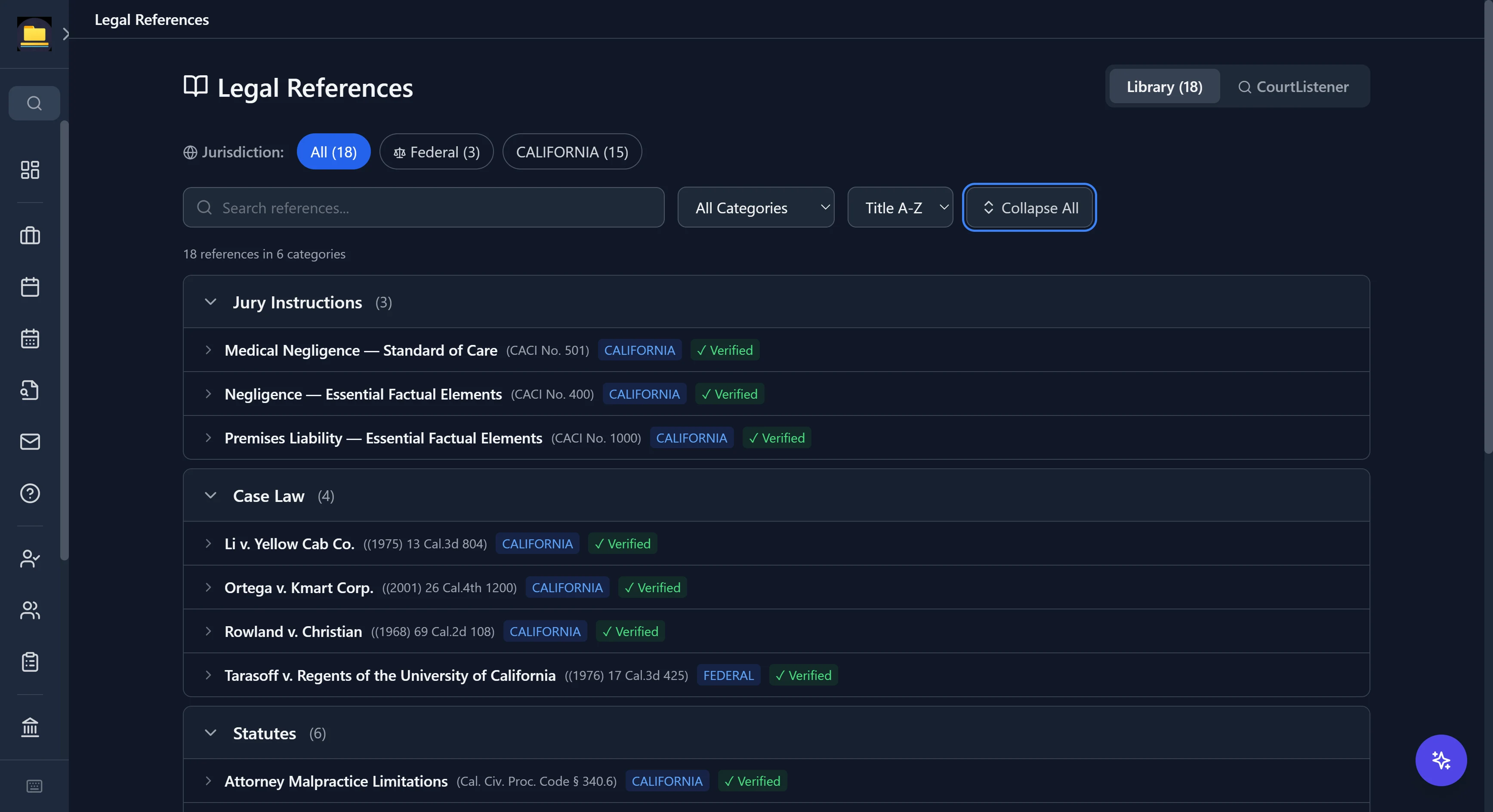
Your law librarian
A 13,400-entry library that comes to the case
Statutes, case law, court rules, practice guides, jury instructions, regulations, and uniform acts — most verified against official sources, with the citation and jurisdiction on every entry. All 50 states, DC, and federal.
- Seven categories, full-text search, and jurisdiction and category filters
- Most entries verified against the official source, with staleness flagging when law ages
- Cross-references between related entries — and per-case smart suggestions by cause of action
- Live CourtListener search built in: pull a current opinion and save it to your library
Your docketing clerk
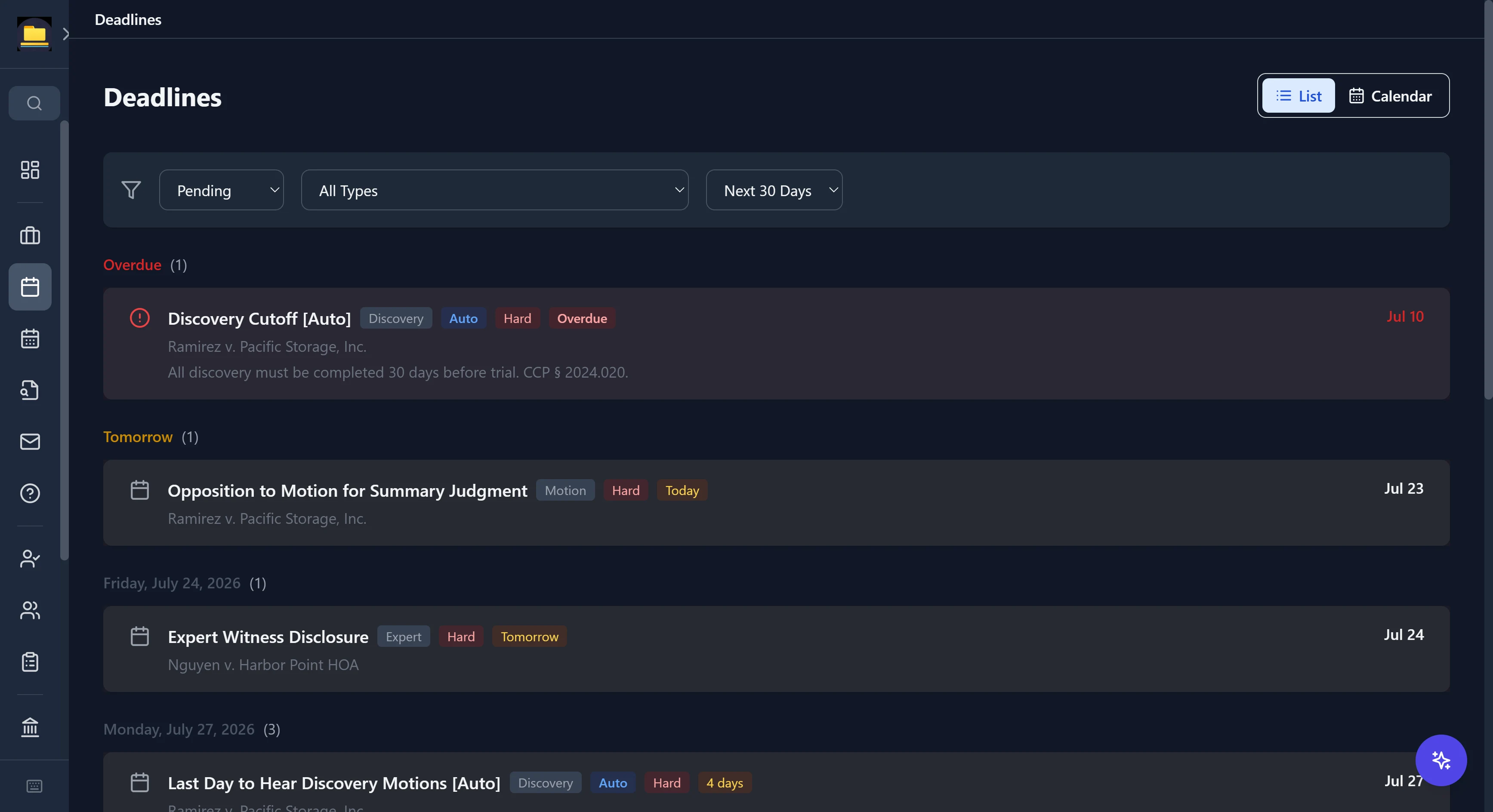
Deadlines that show their authority
Set a trial date and CaseDesk computes the chain — discovery cutoff, expert disclosure, motion cutoffs — from jurisdiction-specific rules, with the governing statute cited on every computed date.
- Auto-computed deadlines labeled [Auto] with the rule they came from
- Court-day and holiday-aware math across 51 jurisdictions
- Overdue and coming-up alerts so nothing slips silently
- Best-practice estimates are labeled as estimates — never dressed up as pinned law
Your mail room, handled
Your inbox, synced to your matters and triaged — without a single message auto-filing itself behind your back.
Auto-syncs in the background
CaseDesk quietly pulls new Gmail and Outlook mail — inbound and sent — into your review queue every few minutes, all day. Connect once with your own account; nothing is stored on our end.
Sorted to the right matter, for you
Every message is matched to a case the moment it arrives, by comparing senders and recipients against your parties and contacts — so mail lands next to the matter it belongs to, not in an undifferentiated pile.
Review-based filing — never automatic
A "Needs Review" queue shows each email with its suggested matter. You file it, dismiss it, or unfile it — nothing attaches to a client file without your say-so. Bulk actions when the volume's heavy.
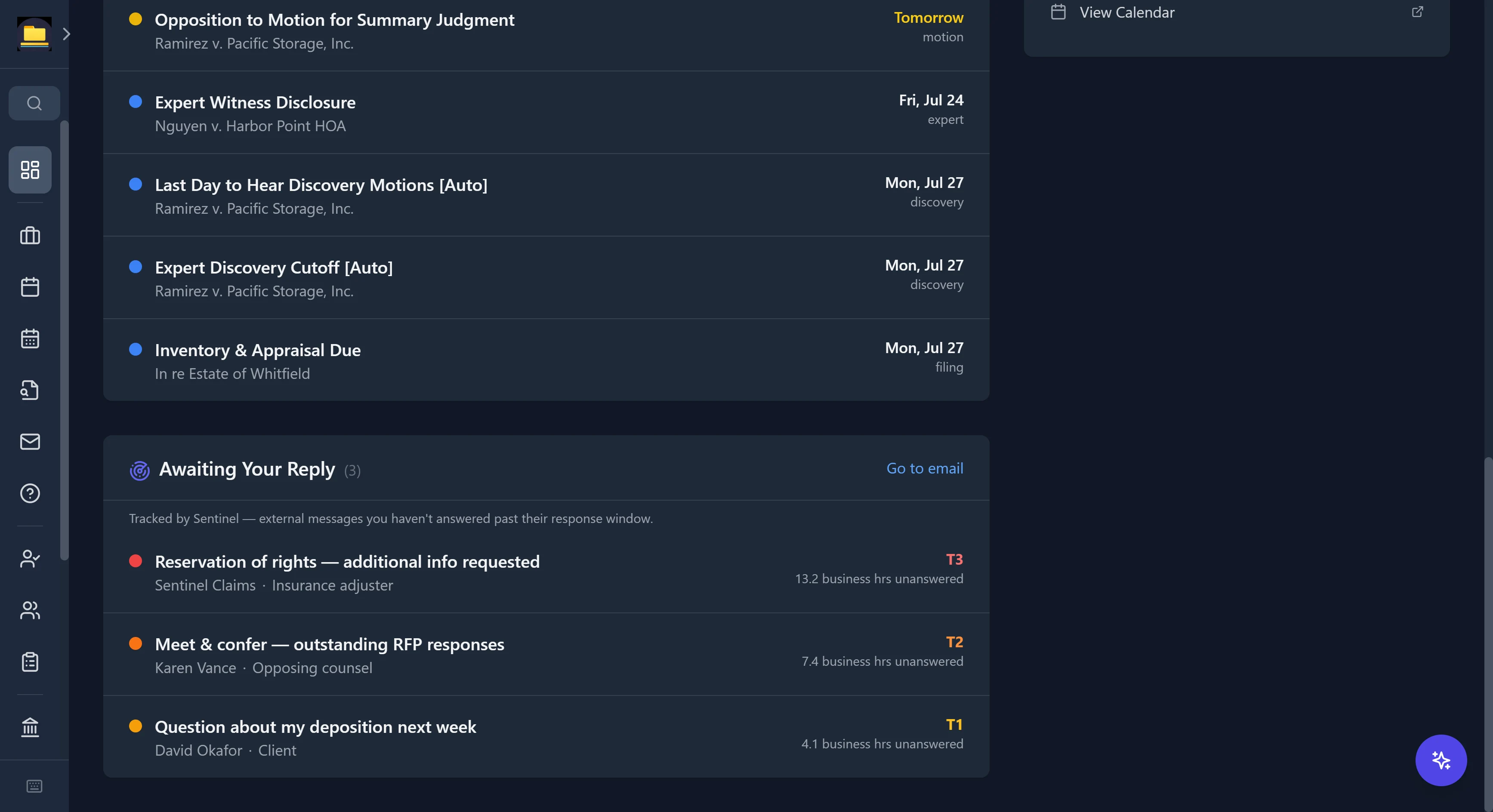
Your follow-up desk · Sentinel
Never let an important email go cold
Sentinel watches who's waiting on you. It recognizes mail from opposing counsel, clients, adjusters, and co-counsel, and quietly tracks how long it's gone unanswered against a business-hours response window — then surfaces what's overdue on your dashboard, before it becomes a problem.
- Knows the sender: opposing counsel, client, insurance adjuster, co-counsel
- Business-hours clock with escalating tiers — nights and weekends don't count against you
- An "Awaiting your reply" list, ranked by urgency, right on your dashboard
- A quiet reminder, never a takeover — it surfaces; you decide
Run the whole caseload
The daily core — matters, calendar, and the command center for every case.
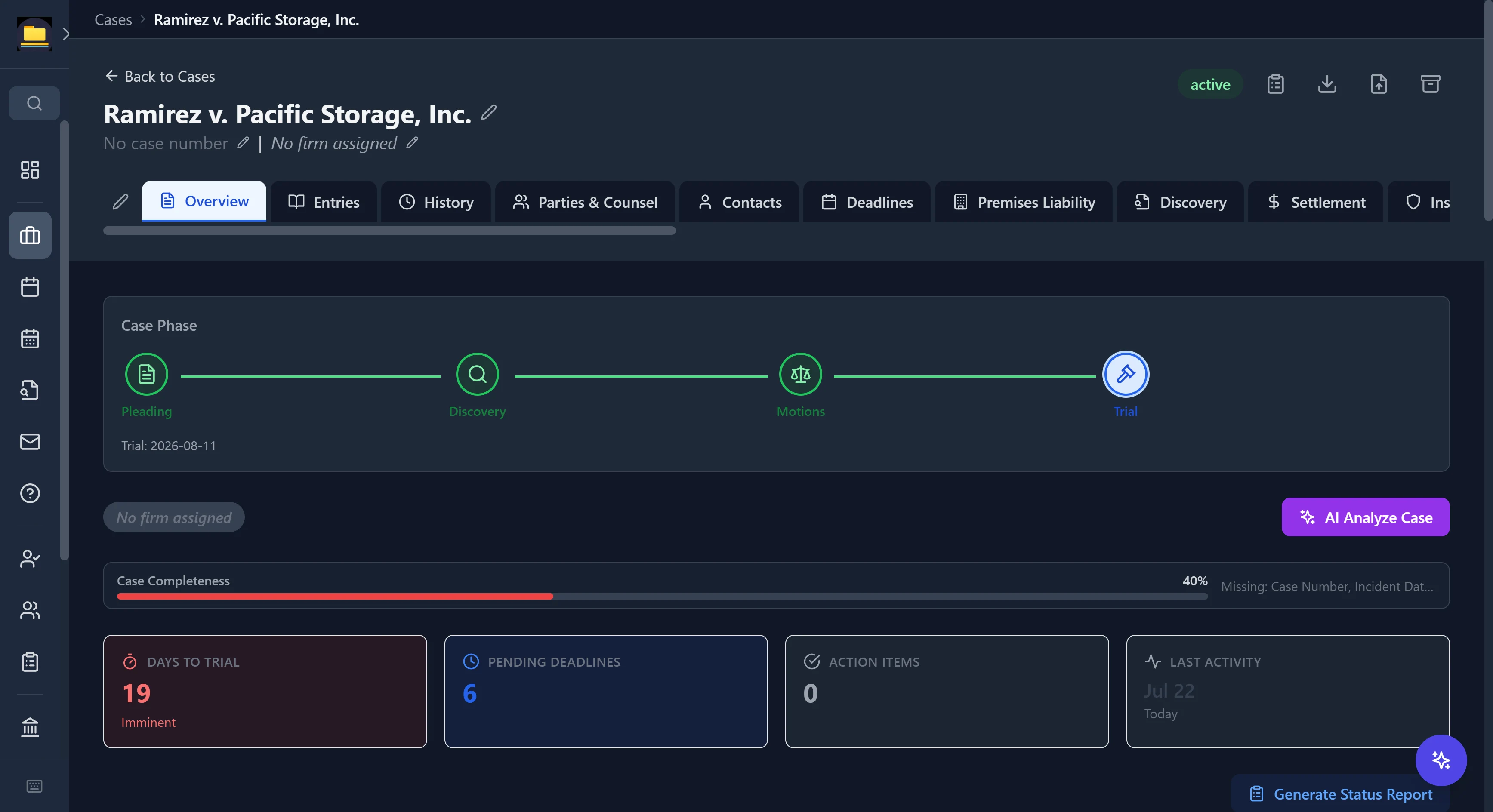
Case command center
Every matter is a command center
Open a case and see where it stands: a phase timeline from pleading to trial, a days-to-trial countdown, pending deadlines, and a completeness meter that names what's missing.
- Case phase tracking across the full litigation lifecycle
- The matter's own practice-area tab, plus parties, discovery, experts, witnesses, docket, evidence, signatures, time, trust, and invoices
- A structured case-memory journal — insights, case theories, risks, even "smoking gun" flags
- One-click status reports, and AI case analysis when you want it
Your calendar clerk
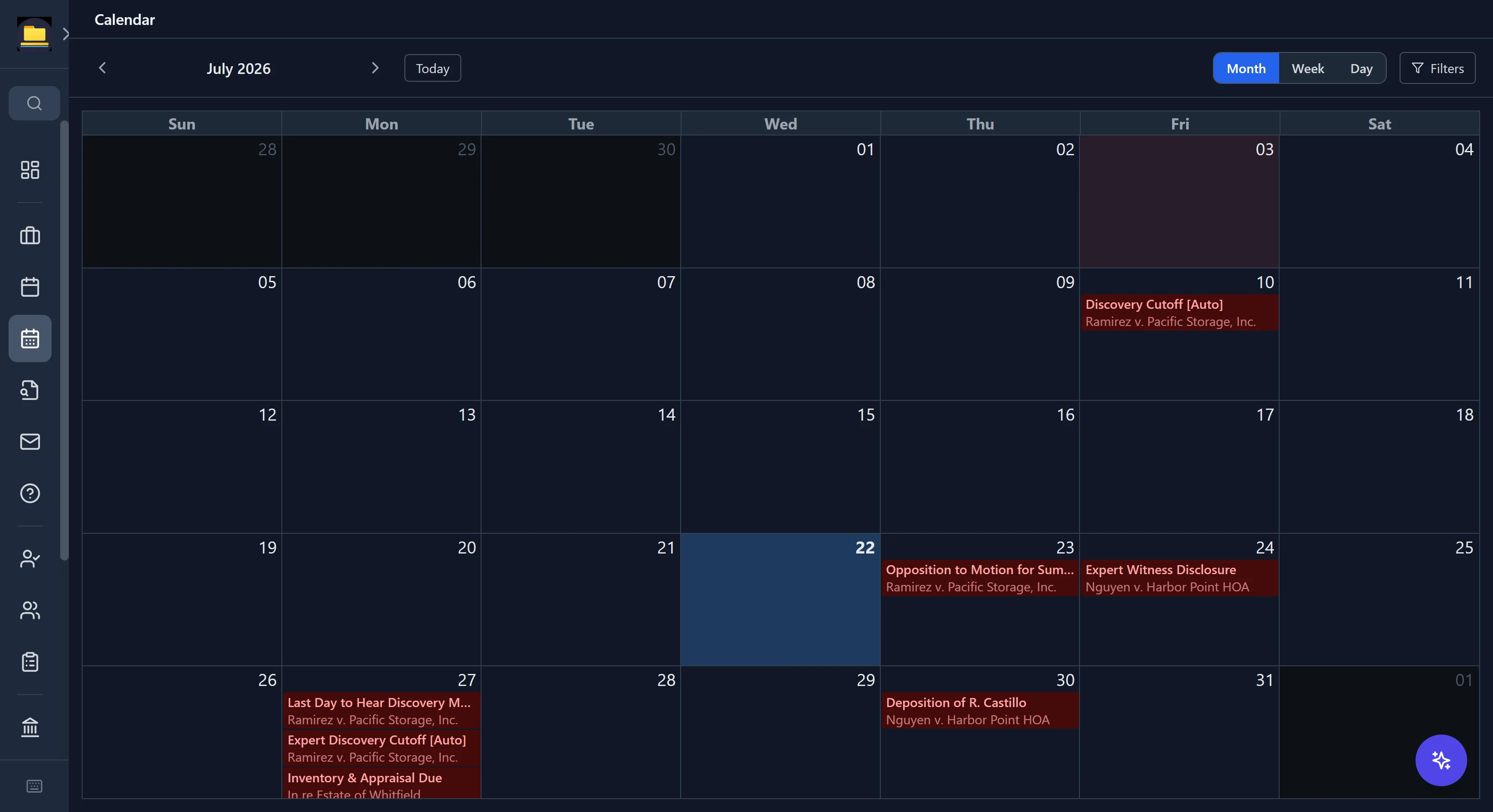
Your whole month, at a glance
Month, week, and day views pull every deadline across every matter into one calendar, color-coded by urgency, with the case name on each entry.
- Manual and auto-computed deadlines side by side
- Filter by case, deadline type, or priority
- Jump from a calendar entry straight into the matter
Matters
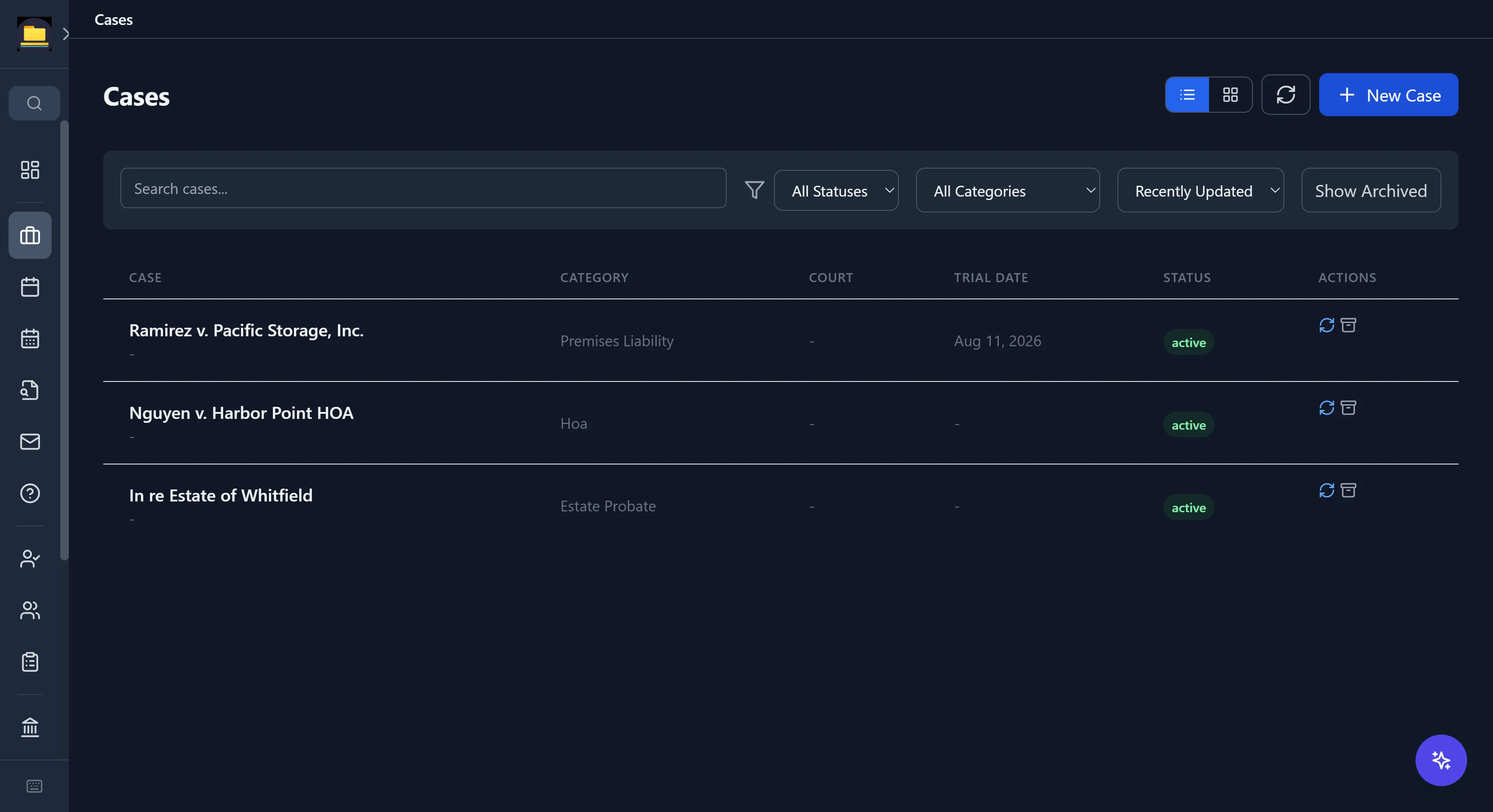
Every matter, every practice area
From premises liability to probate to HOA disputes — 106 practice areas each bring tailored fields, so an estate matter doesn't look like a car crash.
- Status, court, trial date, and category at a glance
- Search and filter across your whole caseload
- Archive closed matters without losing anything
Your court researcher
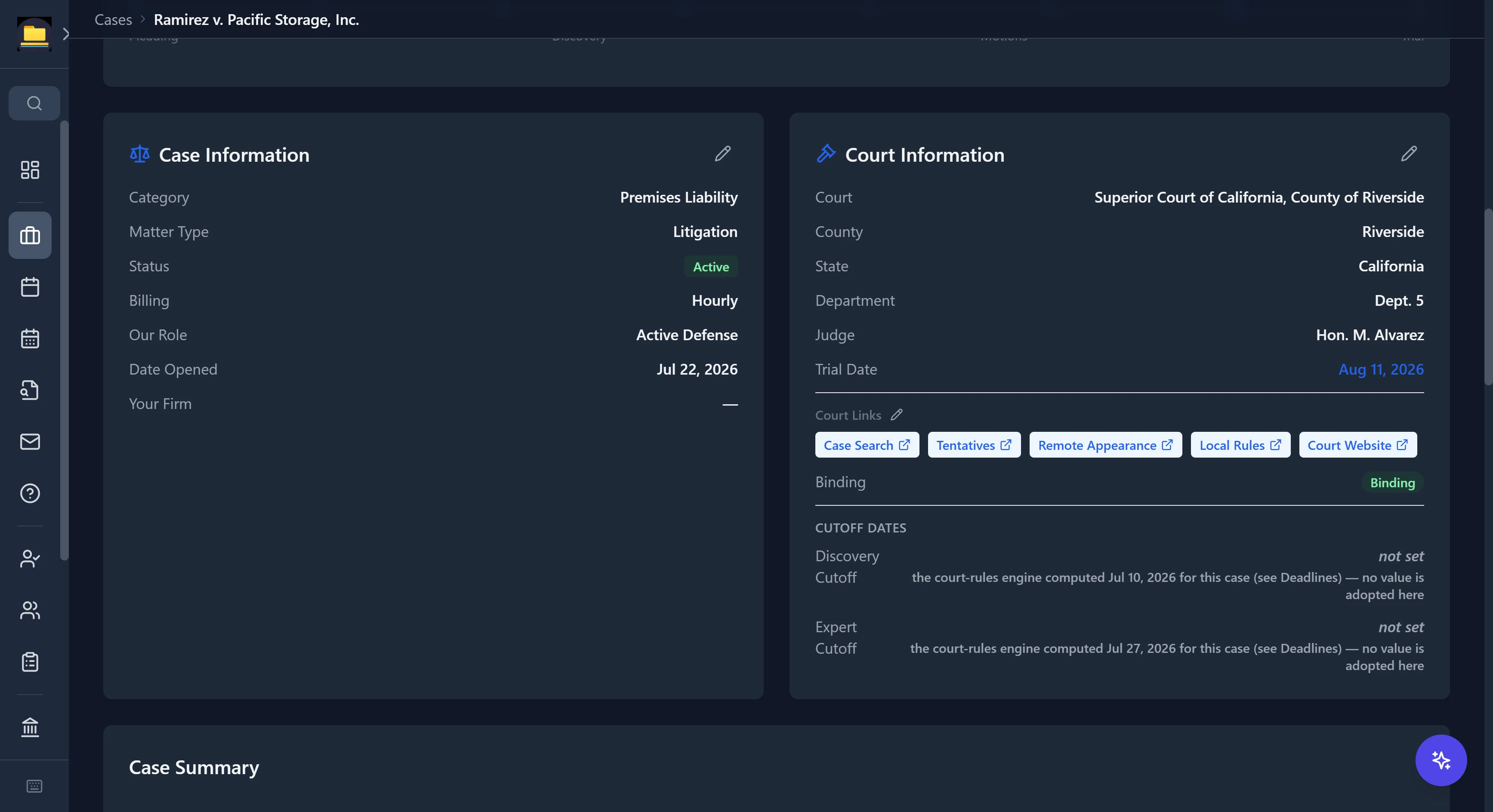
Every court, one click off the matter
Assign a court to a case and its own links live right on the matter — docket and case search, tentative rulings, local rules, remote-appearance info, and the court's website. No more digging through county pages mid-filing.
- 3,100+ trial courts mapped across all 50 states + DC
- Case search, local rules, remote appearance, and court website on every matter
- Tentative rulings where the court publishes them; e-filing and forms for federal
- A warning flag when a court's remote-appearance process isn't straightforward
Draft, file, and stay conflict-free
Substantive templates, guided intake, and ethics-grade conflict checking.
Your drafting desk
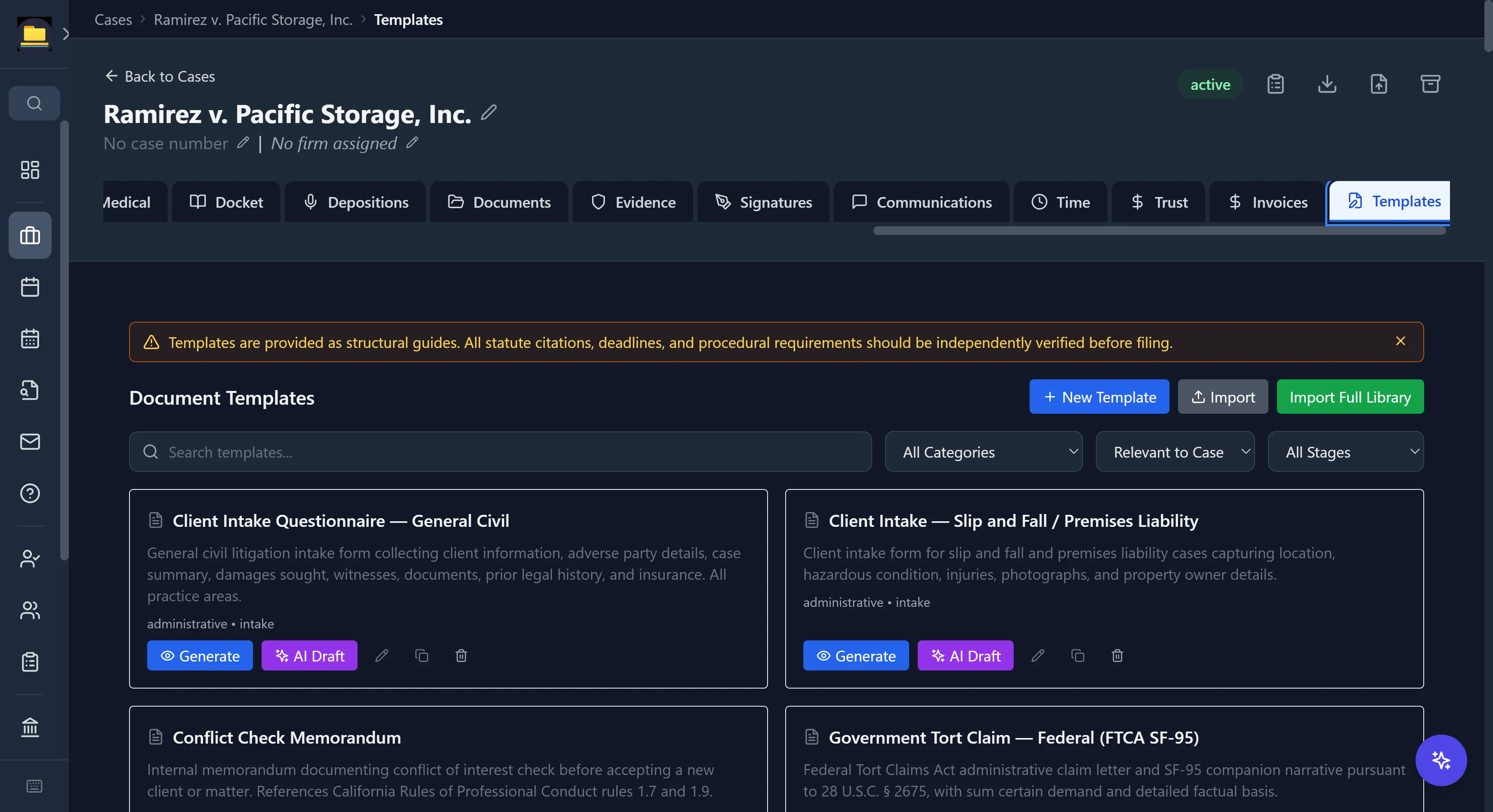
2,300+ templates that already know your case
Substantive legal content — not blank forms — filtered to what's relevant to the matter you have open, with 120+ merge fields that auto-fill from case data.
- Motions, pleadings, discovery, demand letters, intake questionnaires, government claims
- Real citations in the templates — an FTCA claim letter cites 28 U.S.C. § 2675
- Generate as-is, or hand it to AI Draft with your case context
- Honest by design: templates carry a banner telling you to verify citations before filing
Your intake coordinator
Intake that starts with a conflict check
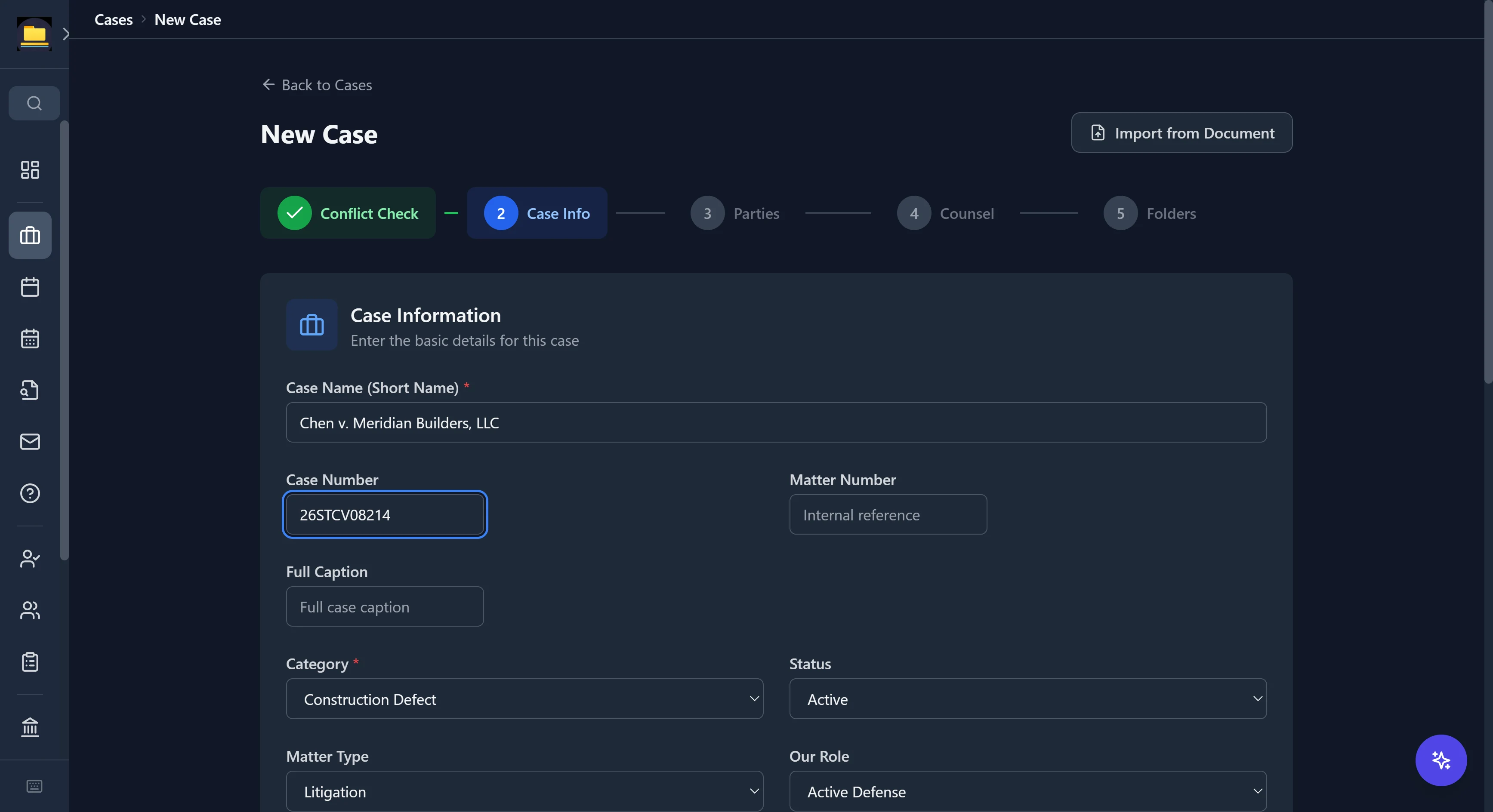
New matters open with a conflict check, then walk through case info, parties, counsel, and folder setup — or import the basics straight from a document.
- Conflict check first, before the matter exists
- Category-aware forms: matter type, venue, role, billing
- Import from a document to skip the retyping
Your conflicts desk
Conflicts caught before they become conflicts
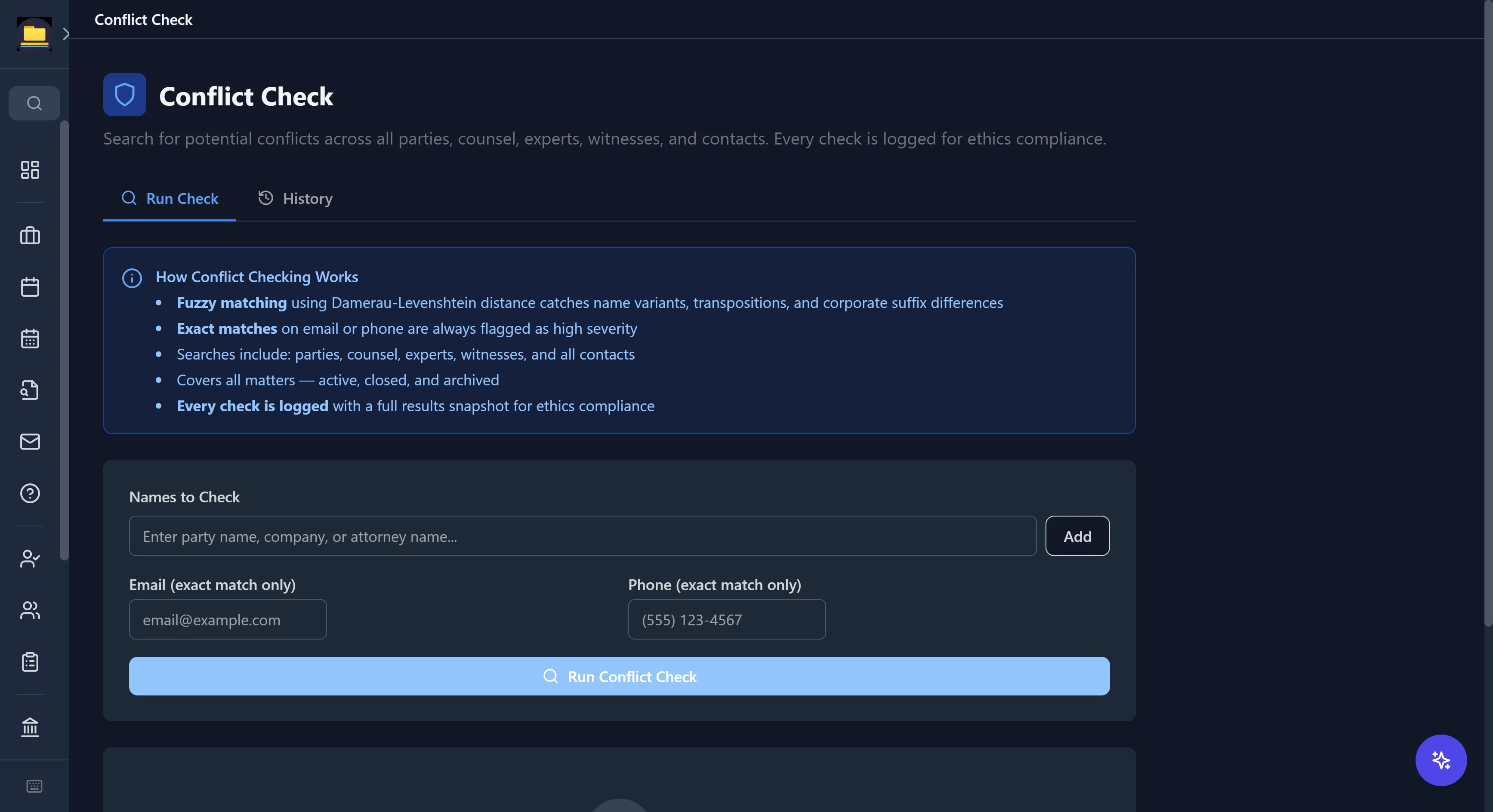
Run any name against every party, counsel, expert, witness, and contact you've ever entered — across active, closed, and archived matters.
- Fuzzy matching catches name variants, transpositions, and corporate-suffix differences
- Exact matches on email or phone are always flagged high severity
- Every check is logged with a full results snapshot for ethics compliance
Your file clerk
Files that sort themselves
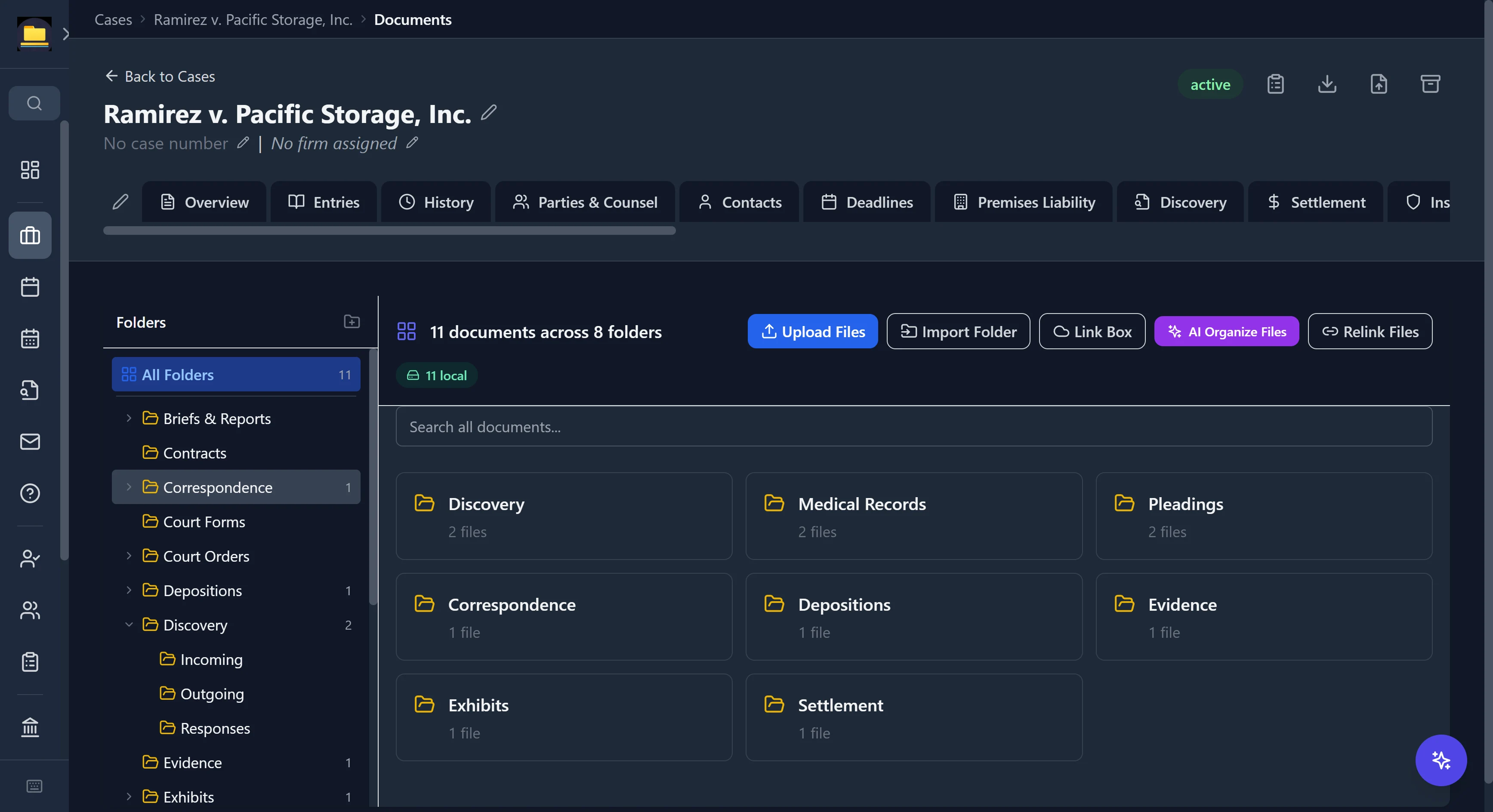
Import a folder and CaseDesk OCRs and auto-classifies each document — pleadings, discovery, medical records, correspondence — into the right folder by filename, content, and source path. The "AI Organize Files" button cleans up whatever's left unfiled.
- Auto-classification by filename, content, and source folder
- A folder-organized view with per-folder counts, not one flat dump
- OCR on import, so scanned documents are searchable
- Mark a document client-visible for the portal — off by default
Your trial team, built in
Depositions, settlement exposure, and a memory for every fact the case turns on.
Your deposition assistant
A deposition outline builder, not a blank page
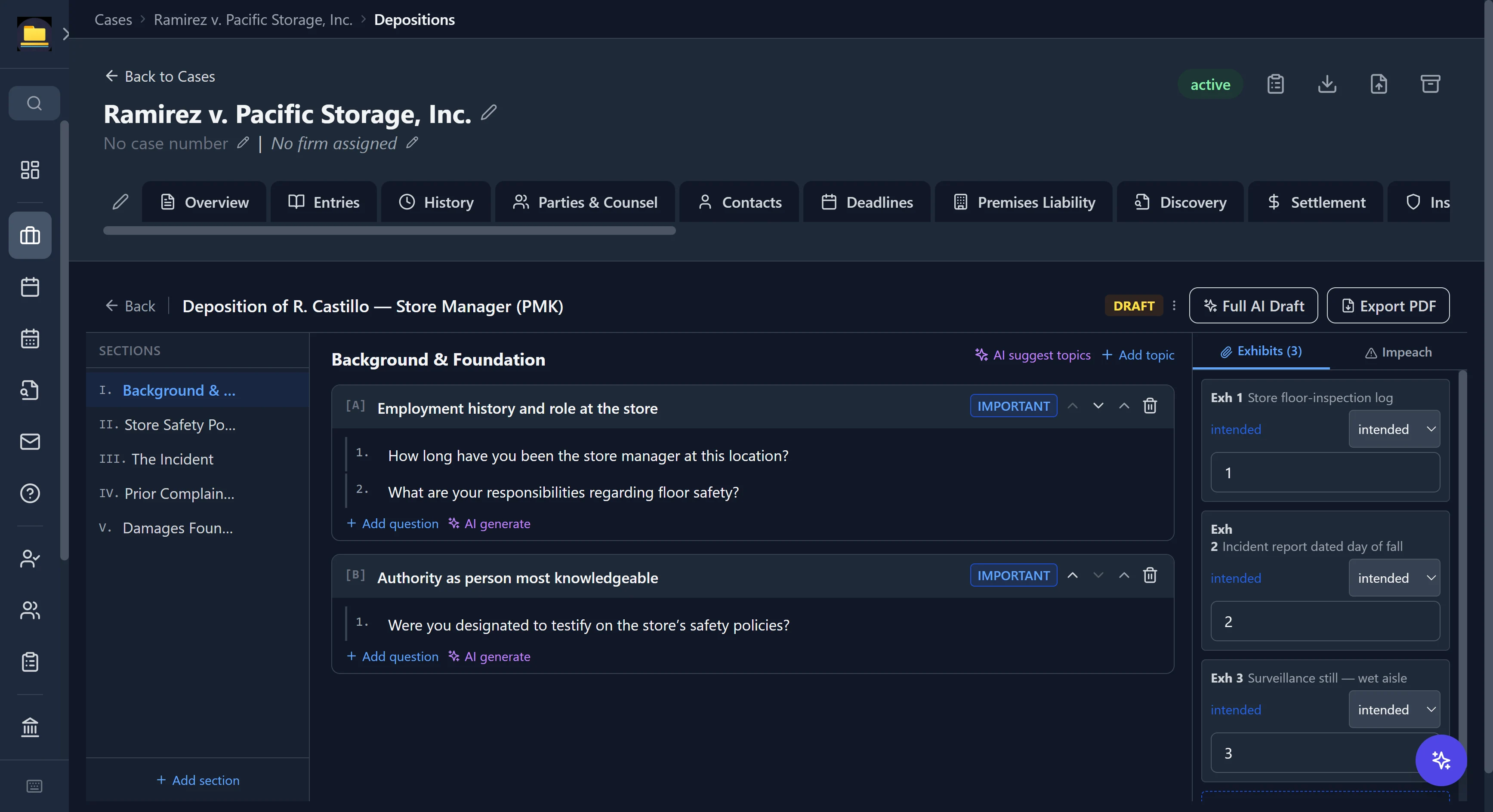
Build structured outlines — sections, topics, and questions — with importance flags, an exhibits list, and an impeachment tracker down the side. Start from a practice-area template, or let AI draft the whole thing.
- Practice-area outline templates with statute-cited topics
- Critical / important flags on every topic and question
- Exhibits and impeachment sources tracked alongside the questions
- One-click full AI draft, or export the outline to PDF
Your settlement analyst
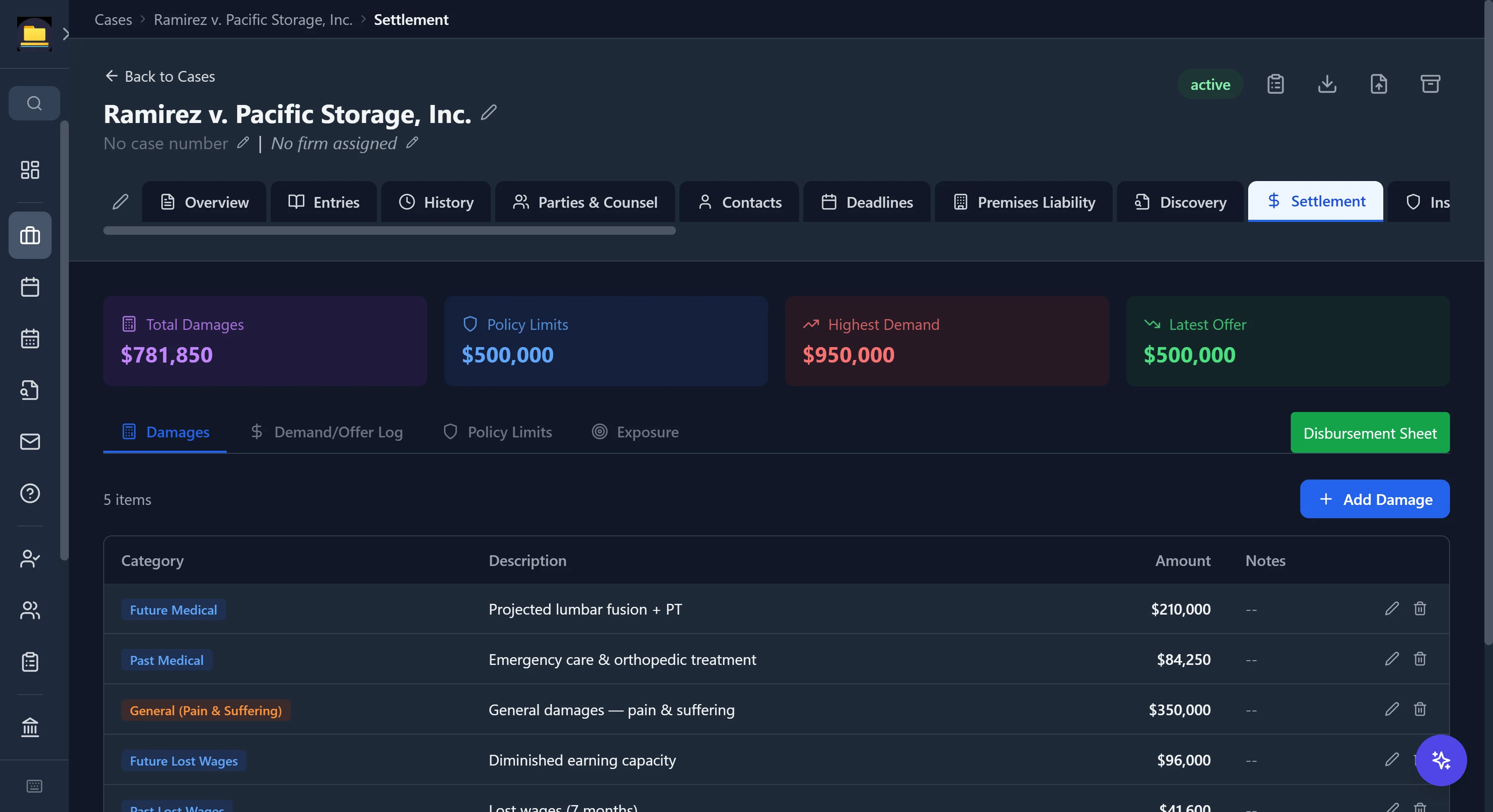
The settlement math, done for you
Track damages by category, log every demand and offer, and watch total exposure against policy limits — with a red warning the moment the worst-case verdict blows through the coverage.
- Damages by category with economic, non-economic, and punitive totals
- Demand / offer / counteroffer log with CCP §998 statutory-offer flags
- Policy-limits tracking with an automatic excess-exposure warning
- Best / likely / worst verdict modeling in one place
Case memory
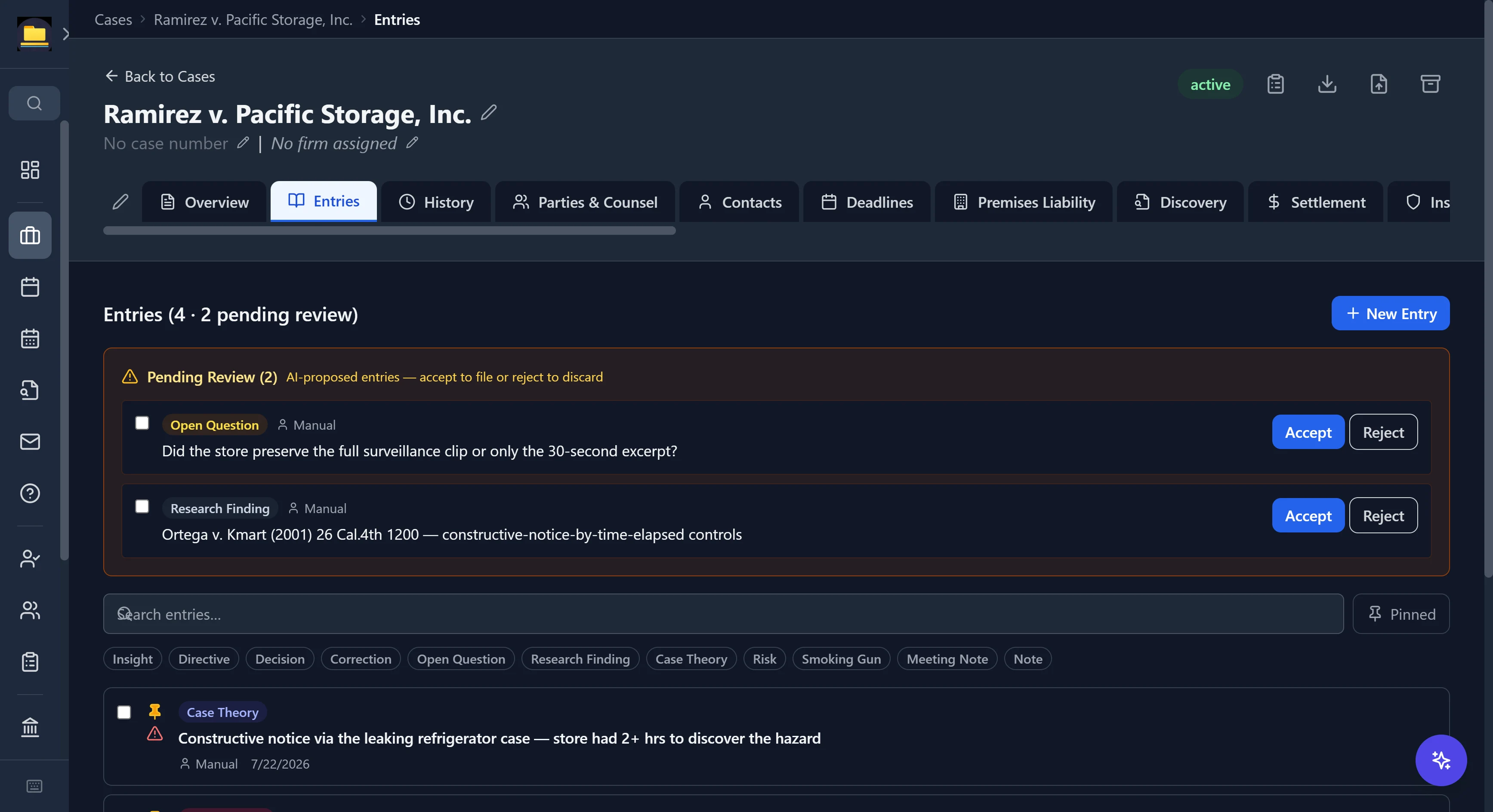
Never lose a case insight again
A structured journal for every matter — case theories, risks, open questions, even smoking-gun flags — that also grounds the AI. When the assistant reads your documents, its proposed entries land in a review queue you accept or reject.
- Taggable, pinnable entries across 11 types, from insight to smoking gun
- AI-proposed entries you accept or reject — nothing files itself
- Critical flags and pins keep the load-bearing facts on top
- The same memory the assistant reads for case-aware answers
The business side, handled
Trust accounting, time, billing, and firm intelligence — without another subscription.
Your trust bookkeeper
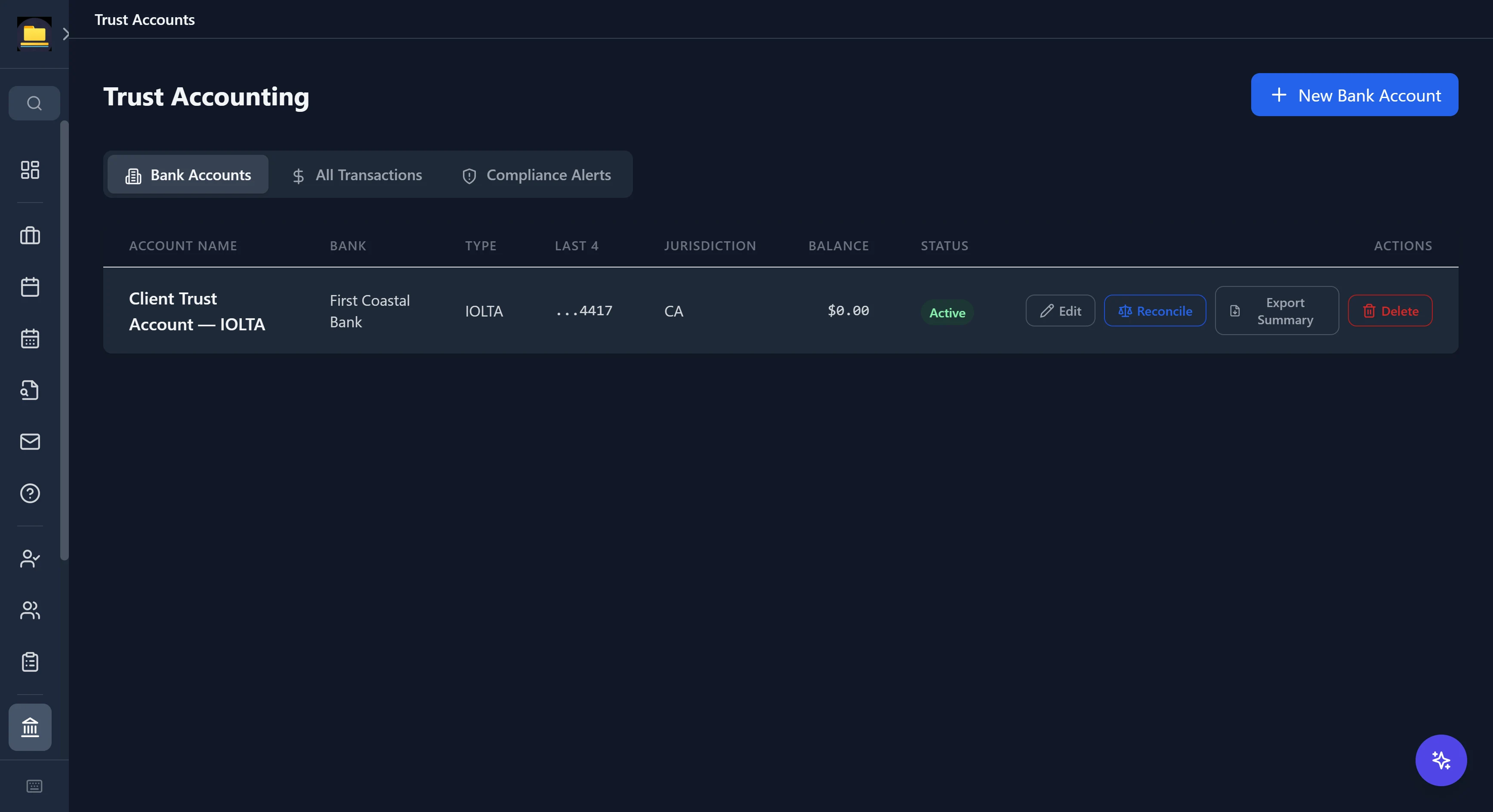
Trust accounting your state bar would recognize
IOLTA accounts with jurisdiction and bar number on file, per-client ledgers, and the reconciliation discipline the rules actually require.
- Deposits, disbursements, transfers, and void operations
- Three-way reconciliation and compliance alerts
- Client ledger, reconciliation, and account summary exports
- Lawyer-attestation gating on sensitive operations
Your billing department
From time entry to LEDES — and the numbers behind the firm
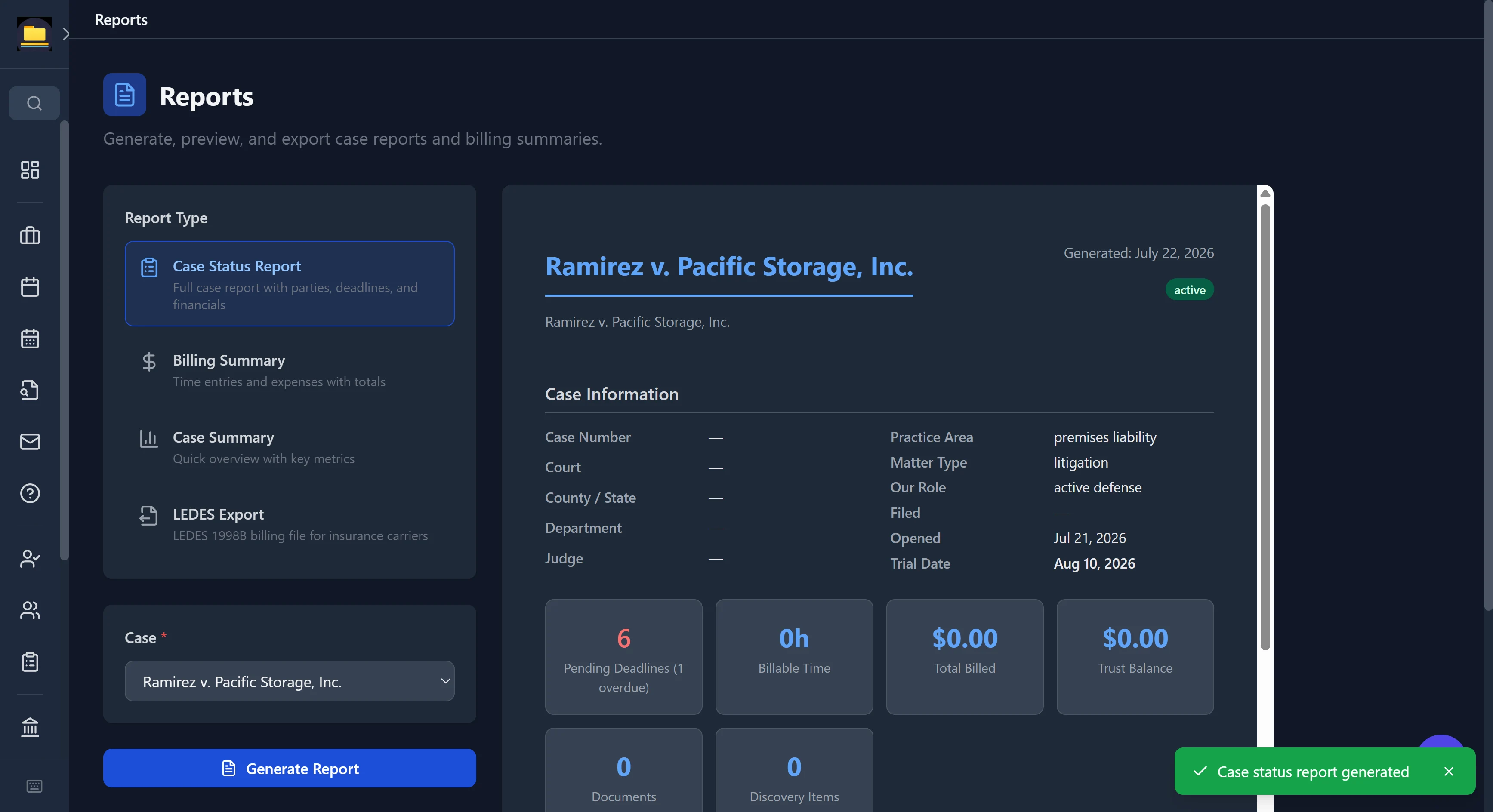
Track time on the matter, bill it, report it, and see how the practice is actually doing — including the formats insurance carriers demand.
- Case status reports with parties, deadlines, and financials in one document
- LEDES 1998B export for insurance-defense billing — built by an attorney whose own practice sends those invoices
- Rate cards and automated recurring invoices
- Firm analytics — WIP, AR aging, realization, utilization, matter profitability, lead pipeline
The rest of the office, in one list
One application for the whole practice — not a bundle of subscriptions.
Each a purpose-built data model — ~180 specialized fields on a typical area — not a generic custom-fields box.
DUI sentencing exposure, Lemon Law restitution, and present-value damages with a low/high settlement range.
Statutes, case law, court rules, jury instructions — most verified against official sources, with staleness flagging.
A structured multi-clock SOL model that flags when a typed date disagrees with the computed governing date.
3,100+ trial courts (all 50 states + DC). Assign one to a matter and its docket search, local rules, remote-appearance, and website links are one click off the case — tentatives where the court publishes them, e-filing and forms for federal.
Know-your-judge intelligence: tentative-ruling system, preferred motion format, courtroom rules, clerk contacts.
Every outstanding request across all your matters in one view, flagged overdue or coming due.
WIP, A/R aging, realization and utilization rates, matter profitability, and a revenue trend.
Recognizes opposing counsel, clients, adjusters, and co-counsel and flags mail you haven't answered past its business-hours response window.
Gmail and Outlook sync with review-based filing. Nothing auto-files.
Default-deny work-product firewall: nothing is visible to a client unless you mark it.
Discovery, experts, witnesses, exhibits, and PACER RSS docket sync — organized per matter.
Bring in files, .eml/.msg email, or whole folders — OCR'd and auto-sorted into the right document type by filename, content, and source folder.
Multi-user roles with per-case read/write/admin permissions, plus two-factor authentication.
SQLCipher database encryption with a 20-word recovery phrase and OS-keystore auto-unlock.
Capture a note by voice and have it transcribed against the matter.
⌘K spotlight across cases, contacts, documents, deadlines — plus full-text search of the whole practice.
Duplicate detection, cross-case linking, and counsel-of-record tracking by side with substitution history.
Optional OneDrive/Google Drive/Dropbox/Box sync — on your accounts, off by default.
Automatic local backups of the encrypted database, on your schedule.
179 MCP tools so AI assistants can work your matters under a read-first permission gate.
Integrations, on your accounts
Every integration is off until you connect it with your own credentials — and each one talks to your account directly from your machine.
The line that actually separates them
Every vendor prints the same feature list. Here's what actually ships in the box — and where your files sleep at night.
| Cloud case managersBrowser-based · vendor-hosted | CaseDeskLocal-first · built by an attorney | |
|---|---|---|
| The architecture | ||
| Where your files live | On the vendor's servers | On your own machine — encrypted, keyed to your OS |
| If the vendor is breached or subpoenaed | Your whole practice is exposed at once | Local by default; Cloud Sync stores only unreadable ciphertext |
| When the internet is down | Browser-based — no connection, no practice | The full app works offline; it's on your machine |
| Telemetry | Inherent — the vendor's servers see your activity | None — only a version check, never your activity |
| AI | Paid add-on — your data goes to the vendor | Local or your own key — no per-seat AI tax |
| Pricing | Per seat, every month | Free during beta; per-attorney after |
| When you cancel | Access depends on an active subscription | Read-only forever — your data is never locked or deleted |
| What ships in the box | ||
| Practice-area setup | Generic custom fields you build yourself | 106 areas with purpose-built fields, out of the box |
| Deadlines | You calendar them by hand | 4,700+ rules compute the date and cite the statute |
| Legal research | Generally a separate subscription | 13,400-entry legal library + live CourtListener search |
| Document templates | Automation shells — you supply the content | 2,300+ substantive templates with real citations |
| Drafting | Merge fields into blank forms; AI drafting is a paid add-on | 120+ merge fields auto-fill from the case, then AI Draft writes from your template with the file's context |
| Document management | Cloud folders you organize by hand | OCR + auto-classification on import — pleadings, discovery, and records sort themselves |
| Court directory | Your own bookmarks folder | 3,100+ trial courts — rules, dockets, tentatives, one click off the matter |
| Legal calculators | Not included | DUI exposure, Lemon Law restitution, damages present-value, SOL engine |
| Litigation work product | Practice management stops at the case shell | Deposition outlines, settlement & exposure modeling, case memory |
| Evidence integrity | Not addressed | Court-defensible chain of custody, built in |
| Unanswered-email tracking | Not addressed | Sentinel flags mail from opposing counsel, clients, adjusters & co-counsel going cold |
The left column describes the browser-based, vendor-hosted model common to cloud practice-management products generally — it is a comparison of architectures, not of any one company, and no specific vendor's current feature set or pricing is represented. Individual products differ and change; check each vendor's own materials for their current details.
Why local-first matters for a law practice
Your files are privileged. A cloud practice-management vendor is a subpoena target, a breach target, and a subprocessor disclosure you owe your clients. CaseDesk's answer is architectural: client data never reaches us because there is nothing of ours for it to reach. The only things that ever leave your machine are the requests you make through accounts you control — your email provider, your AI key, your payment processor.
- SQLCipher encryption at rest, keyed through your OS credential store, with a 20-word recovery phrase.
- No telemetry, no analytics in the app. CaseDesk checks our download host for a new version and nothing else leaves your machine on its own — anything beyond that is a connection you explicitly turn on — no usage data, no case data, nothing to profile you with.
- Bitcoin-anchored evidence gives you tamper-evident timestamps you can defend in court.
- Team roles & per-case permissions plus two-factor auth — ethical-wall screening within the firm.
- Default-deny client portal. Work product is invisible to clients unless you individually mark it visible.
- Ethics-grade audit trails. Conflict checks and trust operations are logged locally, with attestation gates where the rules demand them.
Up and running in three steps
No account to create, no data to migrate, no sales call. Download it and you're working.
Download & install
One installer for Windows or Linux — no license key, no account, no credit card. The whole app runs on your own machine, and every Windows executable we ship, down to the uninstaller, is digitally signed.
Open & secure it
CaseDesk creates your encrypted database and a 20-word recovery phrase, unlocked through your OS credential store. Your files never leave the machine.
Start your first matter
A new case opens with a conflict check, then builds itself for the practice area you pick — the right fields, deadlines, and templates, ready to work.
Free to use. Pro if you want it.
The beta stays free. Pro is optional, cancel-anytime, and exists only to retire the 90-day reinstall cycle.
No license key, no account, no credit card. Download it and run it on your own machine — you bring your own API keys for any services you connect.
Each build runs free for 90 days from first run, then a two-week read-only grace. The 90 days run from this machine's first run, not from each build. Your data is always yours and exportable; a build expiring never deletes or locks it.
Download for WindowsWhy ~1.15 GB? Most of it is the local-AI inference engine, so a model can run on your own GPU without a server. The legal library, court database, deadline rules, and 2,300+ templates ship in the box too — nothing is fetched from us, ever. System requirements.
v1.0.49 · Windows 10/11 · ~1.15 GB · digitally signed by Fulks, Inc.
Larger than previous builds: the GPU engines for every supported card ship inside the installer, so local AI works out of the box with nothing further to download.
Verify your download — SHA-256:dbd97ae142f057340538d3294fdb1ddb600a838a6e0607ca810c69ff3d86604c
First run: Windows SmartScreen may show “Windows protected your PC” while a new build earns reputation. Click More info, then Run anyway, and confirm the publisher reads Fulks, Inc.
.deb for Ubuntu/Debian, ~808 MB — on another distro, take the AppImage (~945 MB; on Ubuntu 24.04 and newer the .deb is the one you want — those releases block the sandbox an AppImage needs, so it has to be started with --no-sandbox). v1.0.49 · 64-bit · the same free beta as Windows, and the newest platform. Local AI included, and it runs on your graphics card — NVIDIA through CUDA, AMD and Intel through Vulkan, with an extra Intel Arc option in Settings. Cloud AI with your own key works too.
SHA-256 (.deb): cf613d951435c193528d299842b43a78b70469d7efa25e8fb4b0350e502d402e
SHA-256 (AppImage): a62021ef24b33693cdc38f0aac53d8ee56301590983801ba1419c2e0d21296df
Apple silicon only (M1 and later) — there is no Intel Mac build. v1.0.49 · ~317 MB · signed and notarized by Apple, so it opens without a Gatekeeper warning. Smaller than the Windows and Linux downloads because macOS runs local AI on Metal, which needs one engine rather than one per graphics vendor.
SHA-256 (.dmg): 684b0c83e9f46fb97503124c1843513d82e930fd4ae9ac98872e8c75d1f074f9
Your cases on your phone. The phone companion reads the same end-to-end-encrypted Cloud Sync as your computers, so it needs CaseDesk Pro with Cloud Sync switched on in the desktop app. Open app.casedesk.law on your phone, join with your Cloud Sync recovery code, and add it to your home screen. The iPhone and Android store apps are the same companion; they are in store review now.
or $290/year · per attorney · available now
CaseDesk Pro — the whole app with the beta expiry removed, so you never reinstall to keep working. Continuously verified deadline rules, legal references, and court data, and priority support. Your machine, your AI keys, no per-seat AI tax.
- ✓ No 90-day expiry — no reinstall cycle
- ✓ All 106 practice areas & calculators
- ✓ Current, source-verified deadline & court data
- ✓ Local-first · no telemetry · bring-your-own AI
- ✓ Cancel anytime — your data stays yours and readable. A lapsed plan drops to read-only; it never locks you out or deletes anything.
Founder pricing: subscribe now and your subscription carries a standing founder discount — whatever the going rate is, you pay less than new subscribers, for as long as your subscription stays continuously active. Any pricing change is announced a full billing cycle ahead and never lands mid-term.
Questions attorneys ask
Are the 106 practice areas really specialized, or just labels?
Really specialized. Each area is its own purpose-built data model — a typical one has around 180 distinct fields organized into area-specific sections, and several go further with built-in calculators (California DUI sentencing exposure, Song-Beverly Lemon Law restitution, present-value damages). A workers' comp matter tracks WCAB numbers and whole-person impairment; an immigration matter tracks A-Numbers and the asylum one-year clock; a class action walks Rule 23 element by element. It's the opposite of a generic custom-fields box.
What is Bitcoin-anchored evidence, in plain terms?
CaseDesk takes a cryptographic fingerprint (a SHA-256 hash) of a document and records it to the Bitcoin blockchain through OpenTimestamps. Because the blockchain is public and immutable, that fingerprint becomes proof the document existed in exactly that form at that time — no one can backdate or alter it after the fact. When you need it, CaseDesk generates a declaration and certificate of authenticity you can attach to a filing. The document itself never leaves your machine; only the anonymous hash is published.
Where does my data actually live?
In a SQLCipher-encrypted database on your own computer, keyed through your OS credential store. By default there is no server-side copy at all; with optional Cloud Sync on, our server holds only ciphertext encrypted on your computer with a key we never receive — so we could not produce readable files in response to a subpoena.
What hardware do I need to run CaseDesk?
Windows 10 or 11 (64-bit), Linux (Ubuntu/Debian .deb, AppImage for other distros), or macOS on Apple silicon (M1 and later) — all three in the same free beta — 8 GB of RAM, and about 3 GB of disk for the app itself. That is the whole requirement for everything except local AI. Local AI runs on your graphics card on Windows and Linux, and on Metal on macOS.
Local AI is optional and scales to your hardware: with no GPU it runs a small model on the CPU, a 6–8 GB graphics card runs a solid mid-size model, and 20–24 GB runs the strongest local legal model. NVIDIA, AMD and Intel cards are all accelerated, on Windows and on Linux. Models are a separate one-time download, from about 3.5 GB up to 145 GB depending on which you pick; most people run one between 5 and 20 GB. You can also skip local AI entirely and use your own Anthropic or OpenAI key, which needs no GPU at all. Full requirements.
Can my whole firm use CaseDesk?
Yes. CaseDesk supports multiple users with roles, per-case read/write/admin permissions, ethical-wall screening, and two-factor authentication on a shared workstation today. Optional end-to-end-encrypted Cloud Sync keeps one attorney's data in step across their own computers today; shared multi-user sync for firms is on the roadmap — if that's what your firm needs, email admin@casedesk.law and tell us about your setup; beta feedback is shaping the order we build in.
I'm on Clio, MyCase, or PracticePanther — can I switch?
There's no one-click migration yet, honestly. Today you can bulk-import your documents and folders — they're OCR'd and auto-sorted into the right matter folders — and new matters can pull their basics straight from an imported document. A guided migration tool is on the roadmap, and early switchers are shaping what gets built first: email admin@casedesk.law and tell us what you're leaving.
Will my free beta copy stop working?
Each build runs free for 90 days from first run, then drops to a two-week read-only grace period. The clock is tied to this machine's first run, so installing a newer build does not restart it — a fresh install on a new machine or profile starts its own 90 days. Your data is never locked and never deleted — during the two-week grace period the app stays open read-only so you can export anything you need. After that a build stops opening until you install a newer free build, which takes a minute and leaves your data untouched. This exists so old beta builds with stale legal data age out, not to squeeze you.
What if you stop developing CaseDesk, or get hit by a bus?
Your matters are on your disk in an encrypted database you control, not in an account we could switch off — so the software stopping does not put your files out of reach. There is one honest catch: beta builds carry a 90-day expiry so stale legal data ages out — you get a two-week read-only grace period to export, and after that the build stops opening until you install a newer free one. So here is our commitment: if CaseDesk is ever discontinued, we will publish a final build with the expiry removed, and say so on this site, so you keep working and keep exporting for as long as you need. We would rather write that down now than ask you to take it on faith.
What happens if my computer is lost, stolen, or dies?
Two layers cover it. Your database is encrypted at rest with SQLCipher and unlocks only through your OS credential store, so a lost or stolen machine doesn't surrender your files. And CaseDesk takes automatic local backups on your schedule — keep one on an encrypted external drive or your own cloud folder, and a 20-word recovery phrase restores access on a new machine. Local-first means your data's safety is in your hands and never contingent on a vendor staying in business.
Can the AI really run without sending my data anywhere?
Yes. CaseDesk can run a legal-grade open model entirely on your own GPU — nothing leaves the building. The local catalog spans DeepSeek V4 Flash, Qwen 3.8, Qwen 3.6, and Gemma 4 — from a 2.3B model that runs on nearly anything to a 1M-context multi-GPU flagship — and you can also point CaseDesk at any GGUF model file you already have. If you'd rather use a cloud model, you connect your own Anthropic (Claude) or OpenAI key — or any OpenAI-compatible endpoint you run or subscribe to — and CaseDesk talks to it directly from your machine, under your terms. Either way there's no per-seat AI tax, because the model relationship is yours, not ours.
Can I rely on the deadline and exposure calculations?
They're aids to a licensed attorney's judgment, not a substitute for it. Deadline rules are verified against official sources and cite their authority; where a rule reflects best practice rather than a pinned statute, it's labeled an estimate, and sentencing/exposure calculators tell you to verify against the current statute before advising. Always confirm against official sources before relying on any date or figure.
How do email integrations work during the beta?
Outlook / Microsoft 365 is fully available. Gmail runs in Google's "testing" mode during the beta, so you'll re-authorize it periodically (Google expires test-app access about weekly) — a minor hassle we'll remove with full Google verification as demand grows. Either way, email sync is read-only and review-based: nothing is auto-filed, and messages stay on your machine.
What platforms does it run on, and what happens after beta?
Windows, Linux and macOS today, all in the same free beta — macOS is the newest, on Apple silicon only. CaseDesk Pro, an optional paid plan, is available now — the free beta continues alongside it. Early subscribers get founder pricing: a standing discount that keeps your rate below what new subscribers pay for as long as the subscription stays continuously active, with any pricing change announced a full billing cycle ahead. Platform support is shaped by what beta attorneys run, so email us about your setup — and nothing changes retroactively for your data, which is on your machine either way.
You're the partner. CaseDesk is the rest of the firm.
An entire law office on your desk — free during beta. Download it, run it on your own machine, and reach us anytime at admin@casedesk.law.
macOS — planned